The majority of testing strategies used in SaaS applications are unsuccessful due to the teams using old software testing methods to cloud products. SaaS is deployed in batches numerous times per day, has thousands of tenants at once, and is required to have a 99.9% uptime globally. Conventional testing fails in such circumstances.
There is a broad gap between theory and practice. Presentation talks at the conferences explain how the ideal automation pipeline in testing works but in practice, flaky tests, sluggish environment setup, and release histories paralysed by test failures. This guide puts emphasis on the practical solutions that are viable within the realities; short deadlines, scarce resources, and never-ending delivery pipelines.
What makes testing SaaS applications different?
Software as a service introduces complexity that on-premise software never faced:
- Applications run on shared infrastructure serving multiple customers from the same codebase
- Updates deploy without user intervention
- Performance depends on network conditions outside anyone’s control
- Security breaches affect dozens or hundreds of companies simultaneously
Teams that test SaaS products like desktop software consistently miss critical issues. Spending weeks validating a release works until that carefully tested code breaks in production because nobody tested multi-tenancy edge cases or API rate limiting under actual load.
Success requires rethinking the fundamentals. Test environments need to mirror production complexity.
What are the core components of effective SaaS testing?
Every SaaS platform must isolate customer data while sharing infrastructure. This creates testing challenges traditional apps don’t face. Tests need to verify:
- Customer A cannot access Customer B’s data
- Heavy usage by one tenant doesn’t degrade performance for others
- Configuration changes for one customer don’t affect anyone else
Effective testing uses dedicated test tenants representing different subscription tiers and usage patterns. Premium tier test accounts have high data volumes and API usage. Basic tier accounts have minimal data. This mix helps identify resource allocation issues before customers encounter them.
👀 Read also: API Testing: Make a rich report using Postman, Newman
Continuous integration and deployment testing
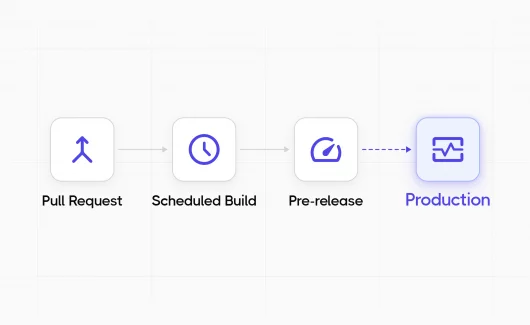
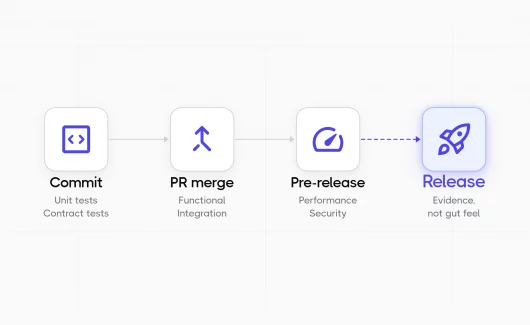
SaaS testing validates changes that deploy multiple times per day. Test strategies must provide rapid feedback without blocking releases. This means building test automation that executes in minutes. Successful teams structure tests in layers:
- Unit tests run on every code commit and complete in under 2 minutes
- API integration tests execute on pull requests and finish within 10 minutes
- End-to-end tests run on staging environments and take 30 to 45 minutes
Balance coverage with speed. Trying to automate every scenario creates maintenance nightmares and slow test suites that developers ignore. Automation works best on critical paths and frequently changed code.
What are the main types of testing for SaaS applications?
Functional testing ensures that the features are as intended. In the case of SaaS products, these involve business workflow validation, data processing and user interfaces, and API endpoints. The problem is to have a perfect coverage of the test and adjust it to the regular changes. An effective division is 70% automated, 30% manual as far as functional validation is concerned:
| Testing Type | Focus Areas | Execution Timing | Primary Goal |
| Automated Testing |
|
Runs on every deployment | Catch regressions immediately and ensure system stability |
| Manual Testing |
|
Performed during feature updates and releases | Validate user experience, uncover nuanced issues, and assess real-world behavior |
Performance and load testing
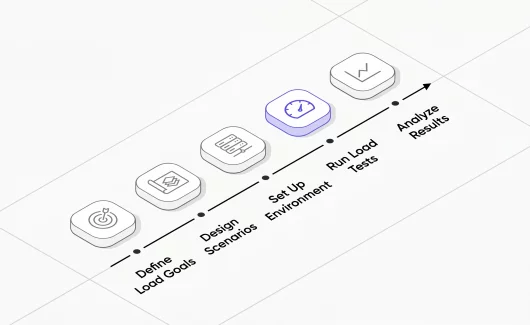
SaaS products should be able to support different user loads without falling. Performance testing checks the performance of a system in relation to response time, resource usage and scalability. Load testing is the one that looks at high performance when the number of people utilizing it is high.
Conducting basic load tests on feature branches prior to merging detects performance regressions at once as opposed to finding them in production. Staging environments are tested every week to ensure that applications scale correctly to increase usage.
Simplistic hammering is not as good as realistic scenarios. The 10,000 simultaneous requests to the login page do not tell much about the behavior of the system. Better tests model real user patterns:
- Browsing
- Searching
- Creating records
- Running reports
Security testing and compliance validation
The SaaS testing of security should not be periodic, but a continuous one. Add automated security testing to CI/CD pipelines in order to identify vulnerabilities during the development stage:
- Static code analysis
- Dependency scanning for known vulnerabilities
- Dynamic application security testing
Manual security testing focuses on:
- Authentication and authorization logic
- API security
- Data encryption verification
- Third-party integration security
The SaaS model amplifies security importance because breaches affect multiple customers. Testing validates:
- Proper data isolation between tenants
- Secure credential storage
- Protection against SQL injection and cross-site scripting
- Proper access control enforcement
Compliance testing ensures applications meet regulatory requirements for specific industries and regions:
- GDPR for European customers
- HIPAA for healthcare data
- SOC 2 requirements
- Industry-specific standards
Run these tests before every major release to provide evidence of ongoing compliance.
Integration and API testing
SaaS applications often integrate with dozens of third-party services. Integration testing validates these connections work correctly and handle failures gracefully. When external APIs are slow or unavailable, applications should degrade gracefully rather than breaking entirely. API testing focuses on:
- Contract validation
- Error handling
- Authentication and authorization
- Rate limiting behavior
- Data transformation correctness
Contract testing ensures that API changes don’t break existing consumers. When endpoints get modified, automated tests verify backward compatibility.
Testing third-party integrations requires mocking external services for most tests. Real integration tests run less frequently because they’re slower and less reliable. Maintain test accounts with major integration partners and run smoke tests against live services daily to catch breaking changes.
Addressing common SaaS testing challenges
SaaS companies often deploy multiple times daily. Traditional testing approaches won’t keep pace. The solution is shifting testing left: catching issues earlier when they’re cheaper to fix.
| SaaS Testing Challenge | Why It’s a Problem | Impact on Product | Recommended Testing Approach |
| Multi-tenant architecture complexity | Shared infrastructure with isolated customer data increases risk of cross-tenant leakage | Security breaches, data exposure, loss of trust | Tenant isolation tests, data segregation validation, security & penetration testing |
| Frequent releases & CI/CD pressure | Rapid deployments reduce time for regression testing | Production bugs, unstable features | Strong automated regression suite, shift-left testing, pipeline-integrated QA |
| Environment inconsistencies | Differences between staging and production environments | “Works on staging” failures in production | Infrastructure-as-code, environment parity checks, production-like staging |
| Third-party integrations | APIs and external services change without notice | Broken workflows, failed transactions | API contract testing, mock services, integration monitoring |
| Browser & device fragmentation | Users access app from multiple browsers and devices | UI breaks, inconsistent UX | Cross-browser testing, responsive testing, cloud device farms |
| Performance at scale | User load fluctuates unpredictably | Downtime, slow performance, churn | Load testing, stress testing, scalability testing |
| Data integrity & migrations | Schema updates and data transformations risk corruption | Data loss, reporting errors | Database migration testing, rollback validation, backup verification |
| Security vulnerabilities | SaaS apps are constant attack targets | Legal risk, compliance violations | Automated security scans, penetration testing, access control validation |
| Flaky automated tests | Unstable tests reduce trust in automation | Slowed deployments, ignored failures | Test stabilization, proper waits, isolation, regular test audits |
| Poor test data management | Shared or inconsistent test data creates false results | Inaccurate test outcomes | Synthetic test data, data versioning, isolated test environments |
Handling complex test data requirements
SaaS testing requires diverse, realistic test data representing different customer scenarios. Creating and maintaining this data manually doesn’t scale. Effective approaches combine synthetic data generation with production data masking.
Synthetic data generation creates realistic records for testing without using actual customer information. This works well for most functional testing. For performance testing and specific bug reproduction, masked production data works better: real records with sensitive information replaced by fake values. Test data management includes:
- Versioning test datasets
- Maintaining referential integrity across tables
- Resetting test environments to known states
- Providing self-service data provisioning for developers and testers
Without these capabilities, teams waste hours preparing data instead of testing.
Ensuring adequate test coverage
Complete test coverage is impossible, so prioritize based on risk. High-traffic features with complex logic need extensive testing. Simple, rarely used features have lighter coverage. Useful metrics to track:
- Code coverage from unit tests (target 80%)
- API endpoint coverage (target 100% for public APIs)
- Critical user path coverage (manual or automated tests for every documented workflow)
- Defect density by module to identify areas needing more attention
Testing across multiple environments
SaaS applications are designed with development, testing, staging and production environments. The environments vary in configurations: database URLs, API keys, feature flags, and infrastructure scale.
The test environments are to be as close to the production as possible and at the same time be isolated and economical. Infrastructure as code helps to preserve environment parity. The test environments are also generated in the same scripts that are used to provision production, decreasing configuration drift.
How to build effective test automation?
The SaaS testing tool market has exploded with options. Chasing every new tool wastes time and money. Focus on tools that integrate well with existing development stacks and solve actual problems teams face. For test automation:
- Playwright handles end-to-end web testing well
- Postman works for API testing
- JMeter serves load testing needs
These tools cover core requirements without requiring extensive maintenance.
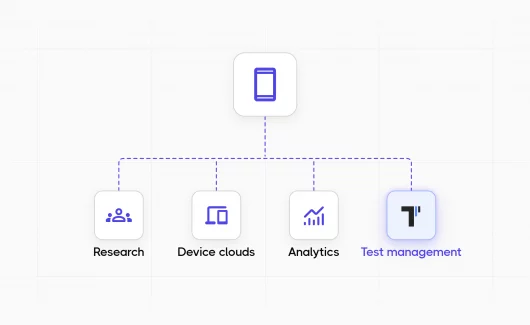
Test management tools organize test cases, track execution results, and provide visibility into testing progress. Platforms like Testomat.io handle both manual and automated testing in a unified system. This integration eliminates duplicate tracking and gives everyone visibility into quality status: developers, testers, and stakeholders.
Implement test automation
Test automation works best when tests are reliable, fast, and maintainable. Flaky tests that pass or fail randomly waste time and erode confidence. Tests that take hours to run won’t get executed frequently enough to catch issues early.
Several principles keep automation healthy:
- Tests must be independent. They should run in any order without affecting each other.
- Use page objects or similar patterns to separate test logic from UI implementation details. This makes tests resilient to interface changes.
- Write tests at the appropriate level: Unit tests for logic; API tests for business workflows; UI tests only for user-facing validation
Codeless test automation tools have matured enough to be useful for certain scenarios. Non-technical team members create and maintain tests using these platforms. Complex scenarios still benefit from scripted automation that provides more control and flexibility.
💡 Read also: Test Automation Strategy – How to Create an Effective Plan
Maintain test suites over time
Test maintenance consumes effort if not managed properly. As applications evolve, tests break and need updates. The key is building tests that adapt to changes rather than requiring constant rewrites.
Data-driven tests separate test logic from test data. This allows adding new test scenarios by adding data rather than duplicating test code.
Abstraction layers isolate tests from implementation details. Regular test suite grooming removes obsolete tests, consolidates duplicate coverage, and improves slow or flaky tests. Review test execution metrics monthly to identify problems before they become critical.
How to measure testing effectiveness: key metrics for SaaS testing
Track metrics that drive better decisions, not vanity numbers. Test count means nothing if tests don’t find bugs or provide confidence in releases. Useful metrics include:
- Defect escape rate (production bugs per release)
- Time to detect and fix issues
- Test execution time trends
- Test flakiness rate
- Automation coverage for critical paths
These metrics highlight problems needing attention.
Continuous improvement through testing
Effective SaaS testing methodology evolves based on what teams learn. After production incidents, conduct blameless postmortems identifying what testing should have caught the issue. Add tests to prevent recurrence. This turns failures into learning opportunities.
Track which testing types find the most valuable bugs. If performance testing consistently catches critical issues, increase investment there. If certain test categories rarely find problems, reduce coverage in those areas to free resources for higher-value work.
Test strategy checklist for SaaS applications
Before launching your testing strategy, verify these elements are in place:
- Automated regression tests cover critical user paths and run in under 30 minutes
- Performance testing integrated into CI/CD pipeline with defined budgets
- Security scanning runs automatically on every build
- API contract tests prevent breaking changes to integrations
- Multi-tenant isolation tested with concurrent operations across test accounts
- Test data management provides realistic scenarios without using production data
- Browser compatibility validated across Chrome, Safari, Firefox, Edge
- Test environments mirror production configuration
- Monitoring tracks test execution time, flakiness, and defect escape rates
- Feature flags enable safe deployment and gradual rollout
Practical recommendations for SaaS testing
Test infrastructure deserves as much investment as test creation. Flaky tests running on unstable environments provide no value.
Make testing visible to entire teams. When developers see test results immediately on pull requests, they fix issues before code merges. When product managers track testing progress in test management platforms, they understand quality status without interrupting testers.
Focus on testing aspects unique to the SaaS platform:
- Tenant isolation API integrations
- Subscription management
- Multi-region performance
Generic testing advice applies, but SaaS introduces specific challenges requiring specialized approaches.
The goal is building confidence that changes won’t break production while maintaining the rapid release pace that makes SaaS competitive. This requires continuous testing, intelligent automation, and willingness to adapt strategies as both products and the testing methods evolve.
Testing SaaS applications effectively means accepting imperfect coverage and the impossibility of eliminating all bugs. Focus on finding critical issues early, understanding risk profiles, and building systems that detect and recover from problems quickly. This practical approach serves production reliability better than chasing theoretical perfection.